A triathlon plan that adjusts itself
Hold your training plan in a project, then check it every morning against what your body actually did and change today's session when plan and reality disagree.
Data you need:
- Training sessions: garmin or polar or whoop or suunto or wahoo or concept2
- Sleep and recovery: oura or garmin or whoop or polar or withings or ultrahuman or apple-health or health-connect
Also needs (in the same chat):
- Google Calendar
See what your account actually has
A plan is only as good as the data behind it. Start by letting your assistant discover which session, sleep and recovery metrics you have and how far each one goes back, so the plan is built on your real training rather than on what you tell it you have been doing.
Run list_metrics and show me which workout, sleep, recovery and training load metrics I have, with their date ranges and source.
Metric names differ per source, so always run this first.
Give the project your athlete profile
Create a project and put the durable facts in its instructions: race date and distance, the weekly hours you can realistically train, which days are immovable, injury history, your weakest discipline, and how blunt you want it to be.
Long-lived facts only. This week's session does not belong here, it belongs in the plan file and on your calendar.
Build the block from your real training
Ask for the plan inside the project, with freddy switched on, and make it justify the volume against what you have actually been doing rather than a textbook ramp. Keep the plan as a file in the project so every later run starts from the same document instead of re-deriving it.
Using freddy, look at my actual training over the last 8 weeks, then build a periodised plan through to my race with a repeating weekly structure. Justify the starting volume against what I have really been doing, not a standard ramp, and tell me where you think the plan is most likely to break. Save it as a plan file in this project.
Put the week on your calendar
Have it write the coming week's sessions to your calendar with the session type, target duration and intensity in the event body.
Write actions are off by default. Until they are enabled for your calendar connector, the assistant can read your week but cannot put anything on it or move anything.
Create this week's sessions from the plan file on my calendar. Put the session type, target duration and intensity in the event body so I can read it from my phone without opening the plan.
Run the morning check
This is the loop. Schedule it for after you are up and your sources have synced, not before. Last night's sleep does not exist anywhere until your watch or ring syncs, so an early-hours run reports on the night before last.
Let it run for a week before you trust it, and read what it changed rather than skimming the summary. Expect to tune the project instructions early: the usual failure is turning cautious after one poor night, which one line fixes, telling it a single bad night is noise and to downgrade only on a trend or after a genuinely hard day.
Using freddy, check whether I completed yesterday's planned session: pull yesterday's workouts with type, duration and intensity and compare them against what the plan called for. Then pull last night's sleep and this morning's recovery, including HRV and resting heart rate, plus my training load across the last 7 days, compared against my own 30 day baseline rather than population norms. Then look at today's planned session on my calendar and decide whether it still makes sense. If it does, confirm it in one line. If it does not, change the calendar event to the session I should actually do, put the reason in the event body, and update the plan file. Tell me what you changed and why, naming which source each conclusion came from. If two sources disagree, say so rather than averaging them. Never compare HRV across different sources. If anything is genuinely ambiguous, such as an unrecorded session or a workout matching no planned one, ask me instead of guessing.
Schedule this as a recurring run. Keep it narrow and save longer reasoning for a weekly review.
What you'll see
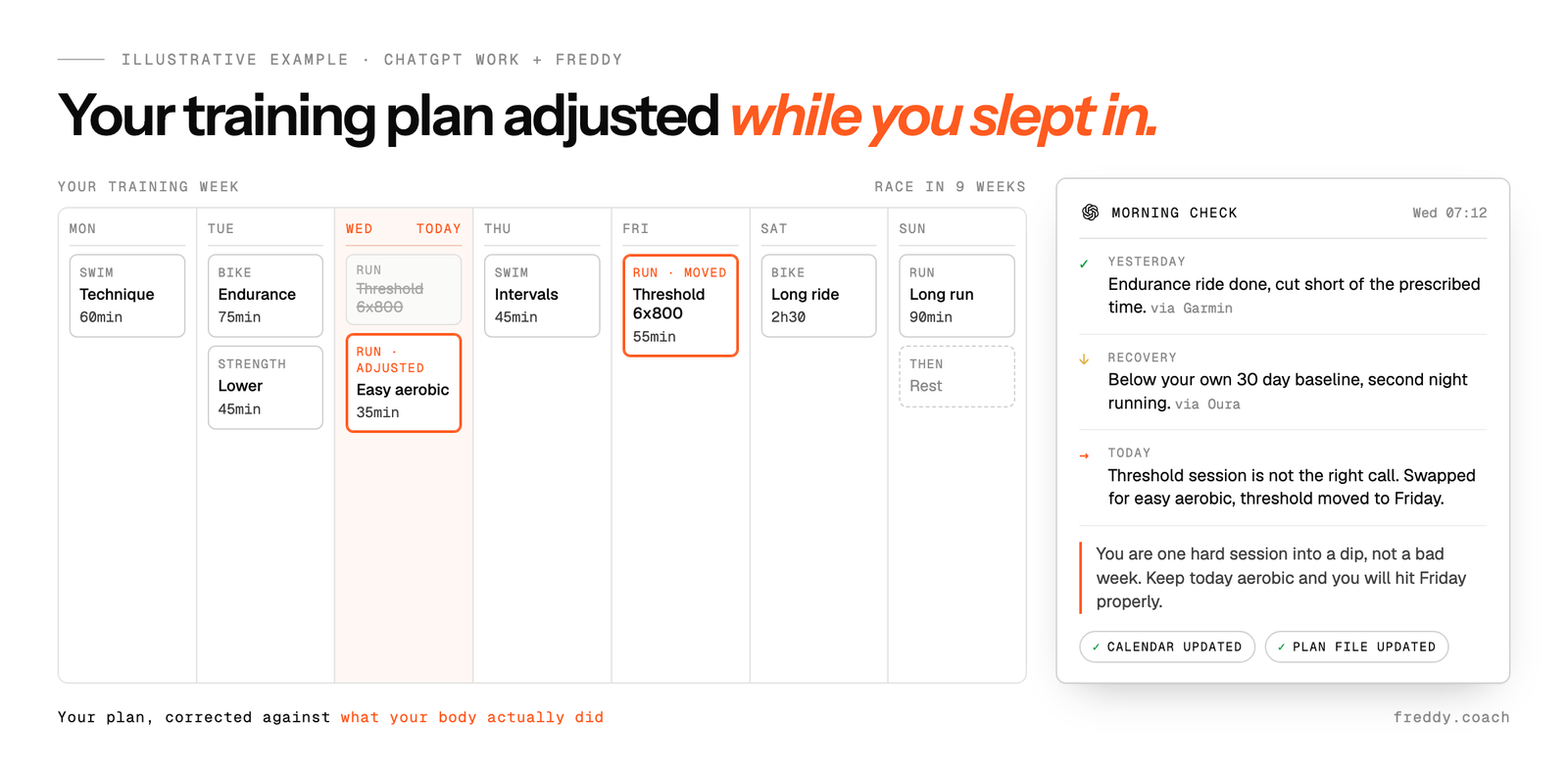
A short daily readout: whether yesterday's session happened as planned, partly, or not at all; where your recovery sits against your own recent baseline; and one committed call for today rather than a hedge. When it changes something, you also get the calendar event rewritten, with the reason in the event body, and the plan file updated to match.
The useful surprise is how often it catches sessions you quietly did not do. It is easy to tell yourself you are on plan, harder when something reads yesterday's file and notices the intervals came in short.
Any figures you see in examples of this recipe are illustrative, not readings from a real account.
Good to know
The calendar write-back needs an assistant that can both run on a schedule and edit calendar events. Elsewhere the same prompts still work as a read-and-propose loop: you get the verdict and the suggested change, and you make the edit.
Write actions are off by default for connectors. Until they are enabled, the assistant can read your calendar but not change it.
Your calendar connector must be active in the same conversation as freddy, or the assistant sees your training data with nothing to compare it against.
Schedule the check for after you wake and your sources sync. Last night's sleep does not exist anywhere until the watch or ring uploads it, so a very early run reports on the night before last.
Never let it compare HRV across sources. Garmin, WHOOP, Ultrahuman and Health Connect report RMSSD while Apple Health reports SDNN, and these are different measurements rather than different units of the same thing, so a chart mixing them looks meaningful while being nonsense.
Training load and readiness feeds can cover a shorter or staler window than your raw activities, so the assistant may have yesterday's session without yesterday's load. Tell it to say so rather than filling the gap.
Attribute the data as Garmin when it comes from a Garmin device.
This is not a coach and not a clinician. It is good at holding a plan and noticing when reality has drifted from it. Do not use it to train through pain or to rehabilitate an injury.